
SQL JOINS
When I was learning about SQL JOINS I found this cheat sheet and couldn’t anything find better than this. So I want to share with all of you guys.
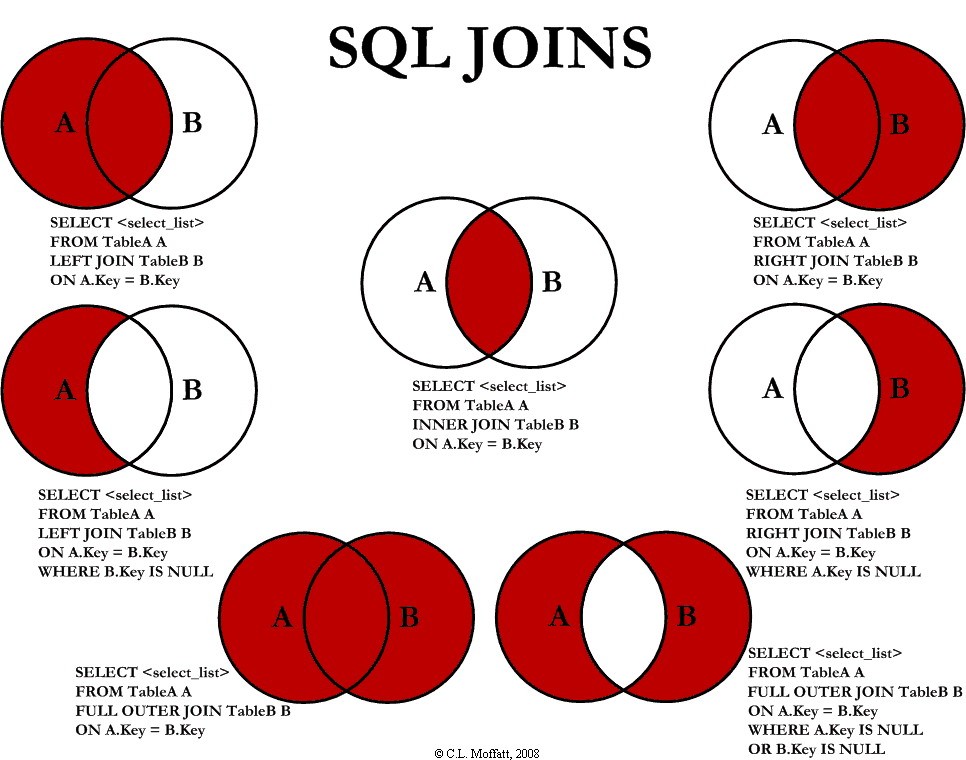
I don’t think I have to explain about the SQL JOINS now.
Image is taken from- Image Source
When I was learning about SQL JOINS I found this cheat sheet and couldn’t anything find better than this. So I want to share with all of you guys.
I don’t think I have to explain about the SQL JOINS now.
Image is taken from- Image Source
Today we’ll be learning to creating Progress Bar Chart in Tableau. I’ll be using superstore data of the tutorial.
Today we’ll be learning how to remove unwanted values from filter using Sets in Tableau. I’ll be using Superstore data for the tutorial. Check out How to use Sets in Tableau for more information about sets.
Today we’ll be learning how to use Set in Tableau. I’ll be using Superstore data for the
tutorial.
Today we’ll be learning about one of the most important statement in SQL that is ‘Update’ statement. As the name says Update statement is used to update the records in the existing table.
Below the table called new_table in database.
Today we’ll be learning to create Yearly/Monthly/Quarterly viz in single chart and the use of DATENAME() function in Tableau. I’ll be using Superstore data for the tutorial.
Today we’ll be learning to create a Search Box in Tableau dashboard. I have used ‘Superstore’ data for the tutorial.
Today we’ll be learning some SQL tips and tricks that could save a lot of time.I’ll be using MYSQL workbench 6.3 for the tutorial. As you know SQL is not case sensitive so query can be written in either of the case.
Below is the table in the database named “new_table”